Develop cross-platform apps with .NET MAUI for Android, iOS, macOS, and Windows
With .NET MAUI, your team serves all four platforms from a single C# codebase instead of maintaining Android, iOS, macOS, and Windows separately. In this training, I get your .NET developers to the point where they set up MAUI apps cleanly and steer clear of the typical pitfalls, from architecture to device access. Hands-on live coding throughout, on a real example project, not slides.
Microsoft MVP since 2013 · Author of the .NET MAUI reference book · 200+ trainings & workshops
Is this training right for your team?
It's aimed at .NET teams that want to carry their existing C# skills over to app development. If you recognize yourselves here, it fits.
From WPF, WinForms, or Xamarin to MAUI
Your team knows C# and .NET but has little or outdated cross-platform experience. We build on what’s there and carry it cleanly over to .NET MAUI.
One codebase for four platforms
You want to serve Android, iOS, macOS, and Windows from one project instead of maintaining separate apps. We show where that holds and where platform-specific code stays necessary.
Clean, not quickly clicked together
MVVM, data binding, dependency injection, and Shell navigation done right from the start, so the app stays maintainable months later.
Content
This structure follows my book and has proven itself across many trainings. Depending on your team's prior knowledge and target platforms, we shift the emphasis; the core stays the same.
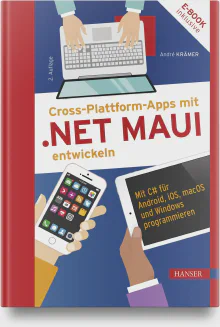
Developing Cross-Platform Apps with .NET MAUI (2nd edition)
I’m the author of the German-language standard reference on .NET MAUI, now in its 2nd edition. The training follows the book’s proven structure and works on its complete example project, so your team gets a clear, battle-tested path and a reference work to keep for afterwards.
To the book →Overview of .NET MAUI
- •What is .NET MAUI?
- •Architecture of .NET MAUI
- •The new single-project system
- •Development tools and operating systems
- •Preparing your own computer for .NET MAUI
- •Pair Visual Studio for Windows with your Mac
- •Debugging on Android devices and Android emulators
- •Debugging on iOS
- •Increase developer productivity with XAML Hot Reload
Creating user interfaces with .NET MAUI
- •Basic knowledge of XAML
- •Surface layout with layout containers
- •Create simple input forms
- •Data binding and the Model-View-ViewModel pattern
- •Display information in lists
- •Navigation strategies in mobile applications
- •The .NET MAUI Shell
- •Icons, fonts, and splash screens
- •Styles and themes
Advanced knowledge
- •Dependency Injection in .NET MAUI
- •The .NET MAUI control architecture (handlers and mappers)
- •Access to device functions
- •Platform-specific rendering with markup extensions
Data storage and communication
- •Use SQLite for local data storage
- •Access to the file system
- •Calling web services
Outlook
- •Notes on migrating from Xamarin.Forms to .NET MAUI


Not an interchangeable trainer. You get me.
A €12.99 video or a provider that sends you some freelance trainer: you can get both anywhere. What you get here exists only once.
The German-language book on .NET MAUI (2nd edition) is mine. You learn from the author, not from someone who read it.
My company builds cross-platform apps for real clients, from driver apps to field-service solutions. I teach what I ship, not just what’s in the docs.
Recognized by Microsoft for over a decade and proven in more than 200 trainings. Training is my craft, not a side gig.
No junior subcontractor, no canned course. From the intro call to the last line of live coding: always me, matched to your team and its target platforms.

Hands-on exercises with my support: your developers write the code, I’m right there to help where it gets tricky.
Frequently asked questions
What prior knowledge does my team need? +
Solid C# skills and experience with .NET. XAML or mobile experience helps but isn’t required: we build the basics together.
Do participants need a Mac? +
For iOS and macOS development, yes, at least reachable on the network. For Android and Windows, a Windows machine is enough. We clarify the right setup for your target platforms beforehand.
Can we migrate existing Xamarin.Forms apps? +
Yes. If your team is facing the migration, we make Xamarin.Forms to .NET MAUI a dedicated focus and look at your actual app.
Is the training remote or on-site? +
Both. Remote or on-site in Bad Breisig, Germany.
Is this slide theory or real practice? +
Hands-on live coding on a real example project throughout. I adapt the program to your team’s target platforms and prior knowledge in advance.
Reviews

We are very happy to recommend our Text Control MVP André Krämer as an external trainer and consultant, who can always help our customers efficiently and in a target-oriented manner thanks to his many years of project experience.

Mr. Krämer took a lot of time for a workshop with us. He came very well prepared and the meeting was extremely productive. His expertise in the area of cross-platform development is impressive.
Tell me where your team stands. I'll tailor the training to fit.

André Krämer
Microsoft MVP since 2013 · AI & .NET Trainer · Book Author
CEO of Quality Bytes GmbH
Request this training
A few lines about your team, your target platforms, and your preferred timeframe. I'll get back to you with a fitting proposal and a no-obligation quote.